top of page

dariana.

×
lesson four.
HTML Table

✮ HTML Tables
- HTML tables allow web developers to arrange data into rows and columns.
✮ HTML Table
- A table in HTML consists of table cells inside rows and columns.
✮ Table Rows
- Each table row starts with a <tr> and ends with a </tr> tag.
- tr stands for table row.
- You can have as many rows as you like in a table; just make sure that the number of cells are the same in each row.
Note: There are times when a row can have less or more cells than another.
✮ Table Cells

- Each table cell is defined by a <td> and a </td> tag.
- td stands for table data.
- Everything between <td> and </td> are the content of the table cell.
Note: A table cell can contain all sorts of HTML elements: text, images, lists, links, other tables, etc.




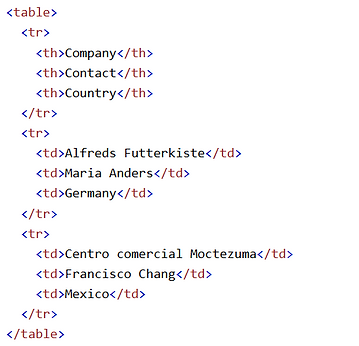







✮ Table Headers
- Sometimes you want your cells to be table header cells. In those cases use the <th> tag instead of the <td> tag
- th stands for table header.
- By default, the text in <th> elements are bold and centered, but you can change that with CSS.
HTML Table Tags


<table> ... </table> TAGS
✮ Attributes
✮ Description
✮ Syntax
BORDER
Defines the line weight of the border around the table cells.
Syntax <TABLE BORDER N>...</TABLE>
=
where N is a number representing the chosen line weight. <TABLE CELLSPACING= N>...</TABLE>
CELLSPACING
CELLPADDING
WIDTH
BACKGROUND
BGCOLOR
Defines the line weight of the border around the table cells.
Defines the vertical spacing between adjacent cells and specifies how much space is between the cell wall and the contents of the cell
Defines the width of the table cells in pixels or as percentage of the container's width
Specifies the graphic to be used as background
Specifies the color to be used as background
<TABLE CELLSPACING=
N>...</TABLE>
where N is the number of pixels between adjacent cells.
<TABLE CELLPADDING= N>...</TABLE>
where N is the number of pixels between adjacent cells.
<TABLE WIDTH = N>...</TABLE> where N is the number of pixels between adjacent cells.
<TABLE BGCOLOR =
"#value">...</TABLE>
where value is the hexadecimal value of a color.
<TABLE BACKGROUND =
"pathname\filename">...<TABLE>
Attributes of the <TD> ... </TD> tag
✮ Attributes
✮ Description
✮ Syntax
COLSPAN
ROWSPAN
BACKGROUND
BGCOLOR
Specifies the color to be used as background.
Specifies the graphic to be used as background.
Merges the specified number of rows.
Merges the specified number of columns.
<TD BGCOLOR =
"#value">...</TD>
where value is the hexadecimal value of a color.
<TD BACKGROUND =
"pathname\filename">...</TD>
<TD ROWSPAN = n>...</TD> where n is the specified number of rows to be merged
<TD COLSPAN = n>...</TD> where n is the specified number of columns to be merged
bottom of page