top of page

dariana.


×
lesson one.
HTML List


✮ Ordered List

- An ordered list starts with the <ol> tag. Each list item starts with the <li> tag.
styles:
1 for Arabic Numbers
i for lowercase Roman Numerals
I for uppercase Roman Numerals
a for lowercase alphabet
A for uppercase alphabet

✮ Unordered List
- An unordered list starts with the <ul> tag. Each list item starts with the <li> tag.


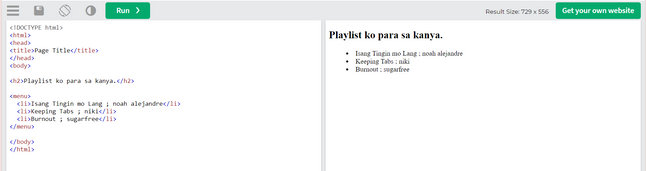
✮ Menu List
- Defines an unordered list of content. Use the <menu> tag together with the <li> tag to create menu items.
Note: <menu> tag is an alternative to the <ul> tag and browsers will treat these two lists equally.
✮ Definition List


- A description list is a list of terms, with a description of each term.
- The <dl> tag defines the description list, the <dt> tag defines the term (name), and the <dd> tag describes each term


✮ Directory List
- Defines a set of instructions or steps.


✮ "OUD-Me-Dir"
bottom of page