top of page

dariana.


LESSON TWO.
- HTML EDITORS -

> HTML Editors:
↣ Web pages can be created and modified by using professional HTML editors. Notepad is commonly used for PC and TextEdit is used for Mac.

STEPS.
Step 1: Open Notepad (PC)
↣ Open the Start Screen (the window symbol at the bottom left on your screen). Type Notepad.
Step 1: Open TextEdit (Mac)
↣ Open Finder > Applications > TextEdit
Also change some preferences to get the application to save files correctly. In Preferences > Format > choose "Plain Text"
Then under "Open and Save", check the box that says "Display HTML files as HTML code instead of formatted text".
Then open a new document to place the code.
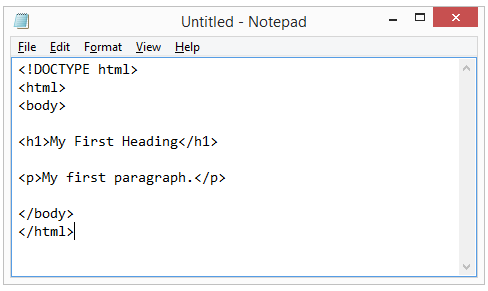
Step 2: Write the format of HTML


Step 3: Save the HTML Page
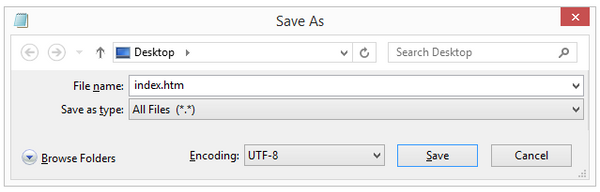
↣ Save the file on your computer. Select File > Save as in the Notepad menu. (remember: use either .htm or .html when saving your file.)

Step 4: View the HTML Page in Your Browser
↣ Open the saved HTML file in your favorite browser (double click on the file, or right-click - and choose "Open with").


bottom of page