top of page

dariana.


HTML Images
×
lesson three.
• Images can improve the design and the appearance of a web page.
• Graphics: Computer generated images.
✮ HTML Images - Syntax
• The HTML <img> tag is used to embed an image in a web page.
• Images are not technically inserted into a web page; images are linked to web pages. The <img> tag creates a holding space for the referenced image.
• The <img> tag is empty, it contains attributes only, and does not have a closing tag.
• The <img> tag has two required attributes:
⍟ src - Specifies the path to the image
⍟ alt - Specifies an alternate text for the image

<img src="url" alt="alternatetext">


✮ The src Attribute
• The required src attribute specifies the path (URL) to the image.
⍟ Note: When a web page loads, it is the browser, at that moment, that gets the image from a web server and inserts it into the page. Therefore, make sure that the image actually stays in the same spot in relation to the web page, otherwise your visitors will get a broken link icon. The broken link icon and the alt text are shown if the browser cannot find the image.


✮ The alt Attribute
• The required alt attribute provides an alternate text for an image, if the user for some reason cannot view it (because of slow connection, an error in the src attribute, or if the user uses a screen reader).
• The value of the alt attribute should describe the image:


• If a browser cannot find an image, it will display the value of the alt attribute:
⍟ Tip: A screen reader is a software program that reads the HTML code, and allows the user to "listen" to the content. Screen readers are useful for people who are visually impaired or learning disabled.

✮ Image Size - Width and Height
• You can use the style attribute to specify the width and height of an image. It specifies the size of the image in pixels (px).


⍟ Note: Always specify the width and height of an image. If width and height are not specified, the web page might flicker while the image loads.
✮ "Width and Height, or Style?"
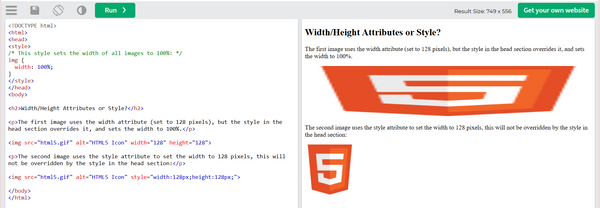
• The width, height, and style attributes are all valid in HTML.
• However, it is recommended using the style attribute. It prevents styles sheets from changing the size of images.

✮ "Images on Another Server/Website"
• Some web sites point to an image on another server.
• To point to an image on another server, you must specify an absolute (full) URL in the src attribute:

⍟ Notes on external images: External images might be under copyright. If you do not get permission to use it, you may be in violation of copyright laws. In addition, you cannot control external images; they can suddenly be removed or changed.

✮ "Animated Images"
• HTML allows animated GIFs:


✮ "Image as a Link"
• To use an image as a link, put the <img> tag inside the <a> tag:


✮ "Image Floating"
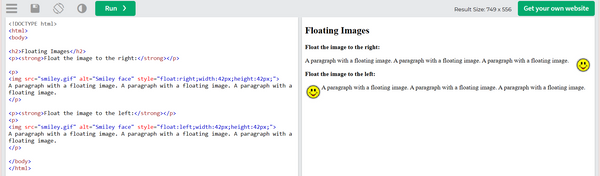
• Use the CSS float property to let the image float to the right or to the left of a text:

✮ Common Image Formats ✮


bottom of page